How it works
Under a minute to set up, two taps to use
There is no onboarding wizard to sit through and no account to create. This is genuinely the whole thing.
- 01
Amount
on the local currency keypad
- 02
Category
suggested from your note
- 03
Saved
converted, dated, filed

- 01
Create a trip
Give it a name, dates and a home currency. Tasca guesses the country from your locale and you can change it. Choose a daily allowance, a trip total, or no budget at all.
- 02
Log the first expense
Tap the log button, type the amount on the keypad, pick a category, and save. The keypad is already on the local currency and the expense is dated today.
- 03
Check the number before you spend
The dashboard shows what is left of today's allowance. Tap any metric tile to switch it between today's spend, average per day, budget remaining or income.
- 04
Handle the awkward ones
Split a hotel across the nights it covers, exclude a prepaid flight from the daily allowance, mark money back as a refund, or split a supermarket run across two categories.
- 05
Read the trip
The stats tab breaks the trip down by country, category and day, with a spend calendar and a map. Tap anything to jump to the entries behind it.
- 06
Take it with you
Export CSV for a spreadsheet, JSON for a backup, or a PDF summary for a claim. Or open the recap and send a card to whoever you travelled with.
During the trip
The dashboard is the whole interface
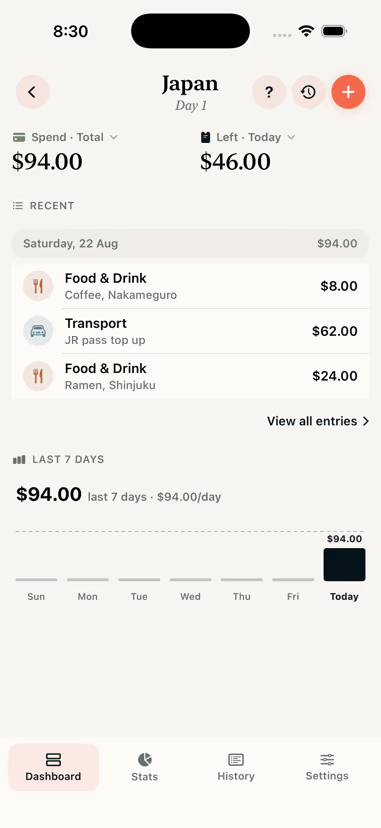
One number at the top, four tiles you can change, today's entries underneath, and a button. That is the screen you will spend all your time on.
- Tap a metric tile to change what it measures and over what period
- Tap an entry to edit it, swipe to repeat, exclude or delete it
- The progress bar tracks today against your allowance
- A quiet banner appears if your pace will not last, but not before day three

After the trip
Then it becomes a record
A finished trip stays in the app. Compare it against the next one, pull the numbers out for a claim, or send someone the recap.
Set it up before you leave.
Or in the taxi from the airport. It takes about the same amount of time.