In review. Launching on iPhone soon.
Know what you can spend today.
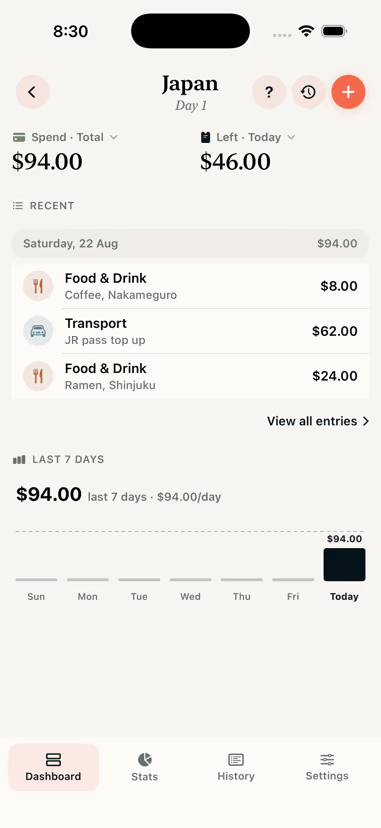
Tasca is a travel expense tracker for iPhone. Log a coffee in yen, a train in euros and a hostel in dong, all in two taps. It converts everything into your own currency and tells you what is left for the day.
- Free
- No account
- Works offline
- iOS 18.6 or later
Multi-currency
Log in any currency
Tasca stores the amount you paid and the converted amount, with the rate and the date it applied. A trip you open in December still shows what it cost in August.
- Set a home currency once and spend in anything
- Rates are cached on device, so conversion works with no signal
- Enter a rate by hand and Tasca keeps using it
- Out-of-date rates are flagged rather than used silently
- ¥1,450Ramen in Tokyo$14.60
- €38.00Train, Milan to Rome$62.10
- ₫210,000Two nights in Hoi An$12.85
- £4.20Coffee, Shoreditch$8.05
Home currency AUD. Rates as at the day each expense was logged.
Everything in the app
What the app does
Including the fiddly parts: timezones, refunds, hotel bills split across nights, and countries you pass through twice.
Multi-currency
Log in yen, see it in dollars. Tasca stores the amount you paid and converts it at that day's rate.
Daily budget
Set a daily allowance or a trip total. The dashboard shows what is left to spend today.
Offline and private
No account, no trackers. Everything is stored on your iPhone and syncs through your own iCloud.
Receipt scanner
Point the camera at a receipt and Tasca reads the amount, merchant and date on the device. Nothing is uploaded.
Stats and stories
Breakdowns by country, category and day, plus a recap you can send to the people you travelled with.
Export
Export the whole trip in a format an accountant or a finance team will accept.
Widget and Siri
Today's remaining budget on the Home Screen, a Live Activity on the Lock Screen, and "Log expense in Tasca" for Siri.
Categories
Label "ramen" as Food once and Tasca suggests it next time. One payment can also be split across categories.

Stats
Where the money went
Every expense records the country it happened in, so a trip through five countries gives you five separate breakdowns.
Cost per day, per country
Compare Tokyo against Hanoi even if you spent very different amounts of time in each.
Spend calendar
A month grid shaded by what each day cost. Tap a day to open it.
Insights that stay quiet
Longest run without spending, biggest single purchase, weekdays against weekends. Shown only once there is enough data.
Pace and projection
Once there are a few days of data, Tasca projects where your pace lands you and flags it early.
Privacy
Nothing leaves your phone
No account, no analytics, no ad SDK. The only request the app makes asks for exchange rates.
What that means in practice- No sign up
- No email, no password. Open it and start a trip.
- Stays on device
- Trips are stored locally and encrypted while your phone is locked.
- Your iCloud
- Optional sync runs through your account, which we cannot read.
- Yours to take
- CSV, JSON or PDF export at any time.
Compare
Compared to other apps
Where each app is stronger, with a date on every claim so you can see when it was checked.
Checked August 2026
Tasca vs TravelSpend
Group trips and Android versus no account and deeper per country stats.
Checked August 2026
Tasca vs Trail Wallet
Trail Wallet came off the App Store in August 2026. What to do about it.
Checked August 2026
Tasca vs Splitwise
Who owes whom versus what the trip is costing you. Which one you need.
Guides
Planning a trip budget
Planning
How to budget for a trip
How to work out a daily number, decide which costs sit outside it, and adjust while you are travelling rather than afterwards.
8 min read
Tools
Daily travel budget calculator
Work out what you can spend per day from your total budget, trip length and fixed costs. Adjust the numbers and see the daily allowance update as you type.
4 min read
Money
How to track expenses in multiple currencies
Why converting as you go beats converting at the end, which exchange rate to record, and how to handle card fees, cash withdrawals and countries you pass through twice.
7 min read
Guides
How to choose a travel budget app
Eight things worth checking before you commit to a travel expense tracker, and how to test each one before you leave.
6 min read
Set it up before you go.
Setting up a trip takes about a minute. In review. Launching on iPhone soon.
Free · iOS 18.6 or later · No account required