Features
What makes Tasca different
Five things separate Tasca from the other travel budget apps. Here they are, with the problem each one solves.

How it works
How logging works
- 01
Type the amount
The keypad is already on the currency you are holding, picked from the trip's country.
- 02
Pick a category
Tasca proposes one from your note. Tap to accept, or correct it once and it remembers.
- 03
Done
Converted, dated, filed under the right country, and off today's allowance before you pocket the phone.
Setup takes about a minute: a name, dates, a home currency and a budget. There is no account to create.
Speed
Logging takes two taps
Most people stop using an expense tracker within a few days, usually because logging a $4 coffee takes longer than buying it.
Type the amount, pick a category, save. There is no merchant field, no payment method and no receipt step to get through first.
- Opens on the local currency for the trip's country
- Category suggested from your note before you tap anything
- Can also be logged from Siri, Shortcuts or the widget
Categories
It learns how you label things
Categorising is usually the first thing people give up on, because most trackers ask you to do every entry by hand.
Type a note and Tasca suggests a category. Correct it once and it writes a rule, so the next matching note goes to the right place. It skips words that carry no signal, so “train to Germany” teaches it about trains rather than about Germany.
- Comes with rules for common food, transport and lodging words
- Learns from corrections and tells you what it saved
- Every rule is visible and removable in Settings

Multi-currency
Covers the currencies you will be holding
A large currency count in the App Store description does not tell you whether the one you need is included.
About 160 currencies convert automatically from official central bank rates, including dong, som, lari, riel and kip. Each expense stores the amount you paid, the converted amount, and the rate and date used.
- Rates cached on device, so conversion works with no signal
- Out-of-date rates are flagged rather than used silently
- Override any rate by hand and Tasca keeps using yours
Stats
A breakdown for every country you visit
A trip through five countries reported as a single total does not help you plan the next one.
Every expense records the country it happened in, so each country gets its own total, cost per day, share of the trip and category mix. Cost per day lets you compare countries you spent different amounts of time in.
- Tap any day to open History filtered to that country and date
- Spend calendar shaded by what each day cost
- Compare this trip against an earlier one on a per-day basis

Privacy
Nothing is collected about you
A travel budget records where you were, when, and what you spent there. Several apps in this category collect that and link it to you.
There is no sign up and no server storing your trips. The app contains no analytics or advertising SDK, and the only request it makes asks for exchange rates, sending currency codes and a date.
- Receipt scanning runs on device and the image is not kept
- Optional sync runs through your own iCloud
- Export the whole trip as CSV, JSON or PDF at any time

Everything else
The rest of it
Each has a page on how it behaves.
Multi-currency
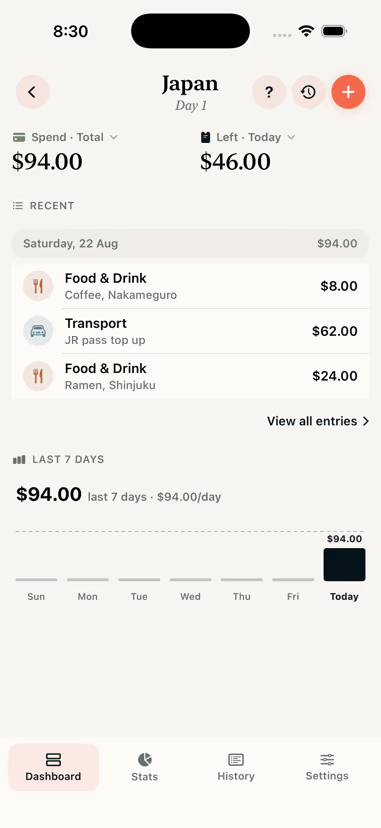
Log in yen, see it in dollars. Tasca stores the amount you paid and converts it at that day's rate.
Daily budget
Set a daily allowance or a trip total. The dashboard shows what is left to spend today.
Offline and private
No account, no trackers. Everything is stored on your iPhone and syncs through your own iCloud.
Receipt scanner
Point the camera at a receipt and Tasca reads the amount, merchant and date on the device. Nothing is uploaded.
Stats and stories
Breakdowns by country, category and day, plus a recap you can send to the people you travelled with.
Export
Export the whole trip in a format an accountant or a finance team will accept.
Widget and Siri
Today's remaining budget on the Home Screen, a Live Activity on the Lock Screen, and "Log expense in Tasca" for Siri.
Categories
Label "ramen" as Food once and Tasca suggests it next time. One payment can also be split across categories.
In detail
If you like reading the spec before installing something.
Entry
- Keypad opens on the local currency
- Category suggested from what you type
- On-device receipt scan for amount, merchant and date
- Siri, Shortcuts, widget and Live Activity
- Repeat an expense onto today or the next few days
- Calculator with tip and split helpers
Money
- Home and spending currency set independently
- ~160 currencies with automatic dated rates
- Rate and rate date stored on every expense
- Refunds, income and excluded entries
- Split across categories by percentage
- Split across the days a booking covers
Insight
- Daily allowance with carry over
- Per country totals, cost per day, share of trip
- Spend calendar heatmap
- Seven day trend and month over month
- Cross trip comparison per day
- Pacing forecast, quiet before day three
Out
- CSV, standard and Excel flavours
- JSON backup with previewed re-import
- PDF summary with charts and tables
- Shareable stats cards and trip recap
- Optional iCloud sync across your devices
- History with search and full filters
Limits
Four things it will not do
Worth knowing before you start a trip rather than during one.
- Bank connections
- No account aggregation and no banking credentials, so there is nothing of yours stored to leak.
- Shared group trips
- It tracks one person. For a settle up between four, use something built for that.
- Android
- iPhone only. It leans on Live Activities, App Intents and on-device Vision.
- Group sync
- Trips live on your device, so there is no server to sync several people through.